> For the complete documentation index, see [llms.txt](https://docs.tip4serv.com/llms.txt). Markdown versions of documentation pages are available by appending `.md` to page URLs; this page is available as [Markdown](https://docs.tip4serv.com/payments/chargeback-protection.md).
# Chargeback Protection
Automatic chargeback protection against fraudsters.
In this article, we will explore the Tip4Serv Chargeback Protection Program, to understand how it works and how it protects you every day against fraudsters.
***
### 1. How to enable it ?
This one is quite simple, you don't need to do a lot of stuff, you can fall into two cases.
#### A. If you use Stripe :
If you are using Stripe, you don't need to do anything, the Chargeback Protection Program is already enabled by default, and will respond automatically to every Stripe dispute for you.
#### B. If you use PayPal :
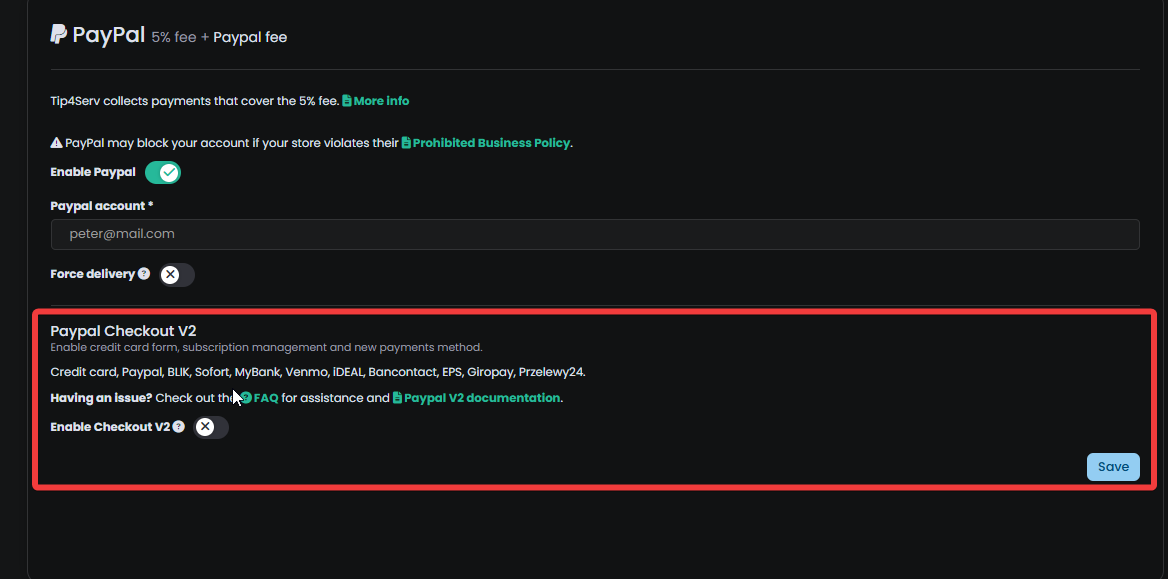
If you are using PayPal, you want to make sure that you are using PayPal v2 and not just the e-mail integration. This is very important, otherwise Tip4Serv won't be able to respond automatically to your disputes.
***
### 2. How does it work ?
Tip4Serv will actively scan your disputes and if a new dispute is opened against you, Tip4Serv will automatically try to respond to it for you. We'll see how Tip4Serv does that by analysing the two main types of disputes.
#### A. Product was not delivered dispute
If the dispute is about a product not being fully delivered, Tip4Serv will collect all the proof of the disputed payments and will check if every server command was executed, if the user clicked on the download button of a file you sold to him, and other elements. All of these elements provide solid proof that your client actually received his product and is straight up lying to the bank and the payment provider.
*If one of your server commands was not executed, or you didn't sell anything tangible to the customer, Tip4Serv will send you an e-mail notifying you that it couldn't find any proof and you will be prompted to resolve this case manually.*
#### B. The payment was fraudulent
This case is a trickier one, the customer is alerting the bank that he wasn't the originator of this payment, but in most cases this is of course a lie. Tip4Serv will first check if 3D-Secure was executed. *(3D-Secure is some sort of 2FA but for bank transactions, this is considered really solid proof that the payment was not fraudulent for most banks.)*
If no 3D-Secure process was executed, Tip4Serv will start connecting the dots between different payments. For example, if we manage to link different payments to the same identity tied to the fraudulent payment, we share the other information as proof that the customer is lying because he already made several other payments to the same store, and therefore, if he claims that this payment is fraudulent, why did he not report the previous payments as fraudulent?
If Tip4Serv couldn't manage to provide any proof, Tip4Serv will alert you by e-mail that this case needs a manual solution.
***
### 3. What to do if automatic resolution failed ?
There's two thing you can do, you can either re-try the automatic resolution or solve this case manually.
#### A. Re-trying the automatic resolution
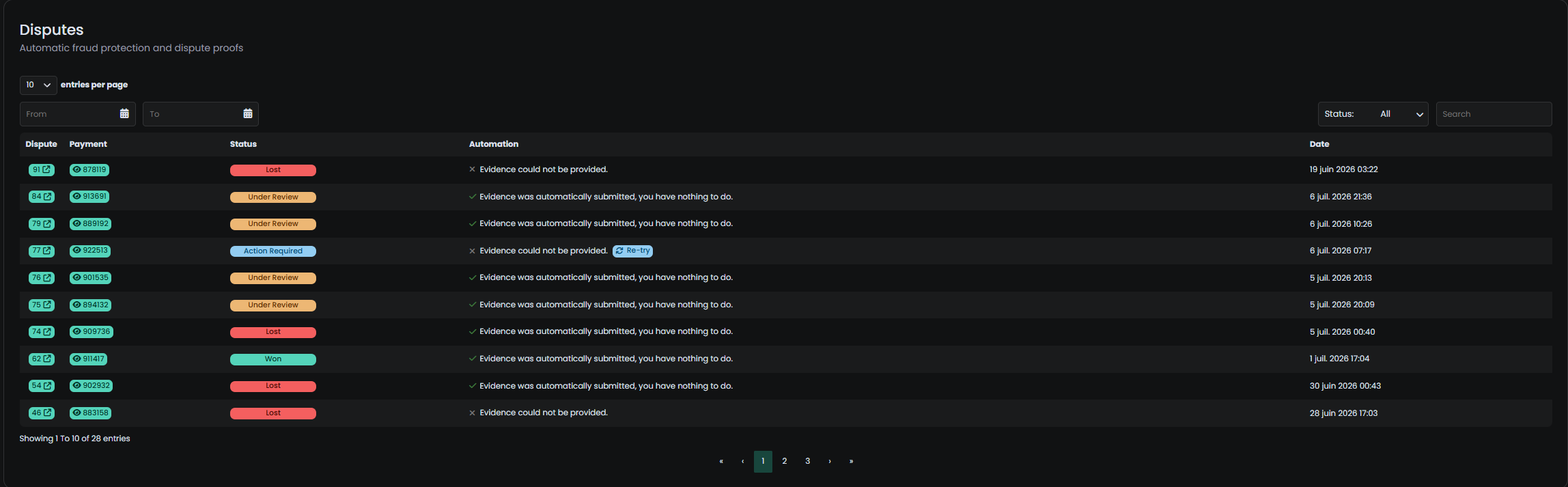
First visit the [Dispute dashboard](https://tip4serv.com/dashboard/disputes), you will be able to see all the disputes that occured against your store.
And simply press the retry button, to retry the automatic dispute. If it fails, Tip4Serv will either provide you with concrete instructions you can execute to successfully retry an automatic dispute or will encourage you to solve this case manually.
#### B. Solving the case manually
You will rarely need to solve cases manually, but the probability that you might encounter one manual case is not 0, so we provided you with another document which shows you how to resolve cases manually here:
{% content-ref url="/pages/XmRHR5qUH8Jb8ca5BEeU" %}
[Manage disputes](/payments/manage-disputes.md)
{% endcontent-ref %}